Image tracking AR
Image tracking AR is useful when the exact visual trigger matters
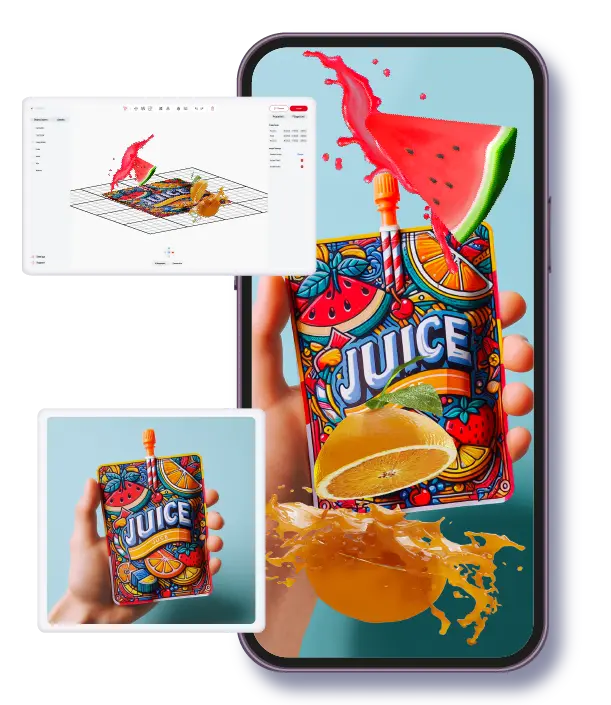
Image tracking AR is often the simplest way to connect digital content to a specific printed or visual asset. Instead of relying on open-ended spatial placement, the system identifies a known image target and attaches the AR content to that target. This creates a highly directed interaction that works well for packaging, print, education, exhibitions, and product content where the visual surface already exists and already has meaning for the user.
Best for
Image-led experiences on printed media, packaging, educational materials, labels, and exhibition objects.
Key value
Tracking is tied to a known image target, which makes the interaction easier to frame and explain.
Operational note
Image quality, scan clarity, and the user instruction layer affect results as much as the AR scene itself.
Technical fit
Image tracking AR begins with a strong image target, not just a strong 3D scene
The reason image tracking works well is that the target provides structure. The platform knows what to look for, and the creator knows what physical context the user is looking at. That creates a more guided AR moment than open placement, which is why image tracking is so useful in campaigns where the printed object or label is already central to the interaction.
The image itself matters. High-contrast, distinctive, and stable visual targets are easier to recognize. Weak or overly busy images can still be used, but they often create more scanning friction, which lowers adoption and can make the experience feel unreliable.
- •Use image tracking when a printed or packaged visual is already part of the audience journey.
- •Treat target selection as part of experience design, not just as a technical setup step.
- •The more obvious the value of scanning, the stronger the participation rate tends to be.
Use cases
Image tracking shines when the physical asset carries product or educational meaning
A product package can become the entry point to instructions, ingredient storytelling, or promotional content. A printed page can reveal an animation or deeper explanation. A classroom image can trigger a model or visual lesson. A museum label or exhibition graphic can open a richer interpretation layer. In all of these cases, the image target matters because it tells the system exactly what piece of the physical world the content should reference.
That specificity is what makes image tracking so dependable in structured environments. It gives the team a repeatable way to connect physical and digital storytelling without asking the user to guess where the experience begins.
- •Packaging and print turn into discoverable digital entry points.
- •Education content becomes easier to explain through scan-triggered visual layers.
- •Art, culture, and exhibition settings can add depth without replacing the physical object.
Limitations
Image tracking is reliable when expectations are set clearly and assets are chosen well
The main limitation is that the experience depends on the target. If the target is unavailable, damaged, poorly lit, or not visually strong enough, the interaction becomes less reliable. That does not make image tracking weak. It simply means the format must be planned in relationship to the actual asset and environment where the audience will encounter it.
Teams get the best results when they keep the scan instruction simple, the visual target distinct, and the first AR payoff immediate. The user should not need to scan, wait, and then guess why the effort mattered.
- •Prioritize strong target imagery and a clear instruction layer.
- •Design the first moment after recognition so the user sees value immediately.
- •Test the physical asset in the real environment before scaling the campaign.
Platform angle
ARLOOPA Studio fits image tracking projects that need repeatable no-code publishing
For teams managing multiple image-triggered activations, ARLOOPA Studio is useful because it supports image tracking within a broader no-code AR creation workflow. That is especially valuable when a campaign includes multiple SKUs, printed assets, educational items, or exhibition graphics that need to be updated over time.
From this guide, the next move is usually to jump into the existing pages that match the business context. Packaging, print media, education, art and culture, and consumer goods all use image tracking differently, and the existing pages cover those environments in more detail.
- •Scale image-triggered experiences without turning each asset into a separate custom build.
- •Update campaign content faster when packaging or printed materials evolve over time.
- •Connect format strategy to the sector-specific pages once the use case is known.
Asset strategy
Image-tracking AR becomes easier to scale when the team plans the visual library up front
Image-tracking projects often expand faster than expected. A team starts with one package, poster, brochure, textbook, or museum asset, then quickly wants to add dozens more. That is where early planning pays off. If the source images are inconsistent, poorly archived, or approved without a repeatable standard, the AR rollout becomes hard to maintain. It is much easier to scale when the team defines which images qualify, how they are named, how content is versioned, and who owns updates.
This is one of the practical reasons to use a platform like ARLOOPA Studio rather than piecing together isolated demos. The value is not only in recognizing the image. It is in managing the experience portfolio around that image library. For sectors like packaging, education, art and culture, and consumer goods, that operational clarity usually matters as much as the tracking itself.
- •Standardize the source-image library before the campaign expands to more triggers.
- •Pair each tracked image with a clear content owner and update process.
- •Plan portfolio management early if the project could grow beyond one activation.
FAQ
Image tracking AR FAQ
What is image tracking AR?
It is an AR format where the system recognizes a specific image target and uses it to trigger and anchor the digital content.
Is image tracking AR different from marker-based AR?
They are closely related. Image tracking describes the recognition method, while marker-based AR describes the broader experience anchored to that visual target.
What makes a good image target?
A good image target is visually distinctive, stable, easy to scan, and directly connected to the user value of opening the AR layer.
Which business teams use image tracking most?
Packaging, print, education, art and culture, and consumer-goods teams use it often because those sectors already depend on physical visual assets.
Existing Studio pages
Related Solutions
Use these established Studio pages when you need deeper solution or industry detail beyond this guide.
Packaging
Turn packaging into a scan-to-open WebAR channel for product education, brand storytelling, promotions, QR campaigns, and loyalty experiences without an app.
Open pagePrint Media
Add interactive AR to posters, flyers, brochures, catalogs, and cards with WebAR, image tracking, video, 3D, and call-to-action layers that launch from QR codes and links.
Open pageEducation
Create AR lessons, learning cards, classroom posters, and educational WebAR experiences that help students explore concepts in 3D without extra app friction.
Open pageArt and Culture
Discover how museums, galleries, exhibitions, and heritage projects use WebAR, image tracking, and geospatial AR to create interactive cultural experiences.
Open pageConsumer Goods
See how consumer goods brands use WebAR, product visualization, and interactive packaging to improve product discovery, marketing performance, and customer engagement.
Open pageContinue reading
Related Reading
These supporting guides answer the next practical questions readers usually have before launching an AR project.
Marker-Based AR Guide
Use marker-based AR when the physical trigger matters and you want predictable, guided activation behavior.
Read guideCreate AR Without Coding
Follow a realistic no-code workflow for AR creation without getting trapped in custom development from day one.
Read guideWebAR Platform Guide
Compare WebAR platforms by mobile access, publishing control, supported formats, and whether a non-technical team can actually run them after launch.
Read guide


