Academy tutorial

How to Animate a Photo with AI and View It in AR

A static image can become more useful when it moves, explains, or tells a short story. This guide shows how to think through AI photo animation and connect the result to an AR experience in ARLOOPA Studio.

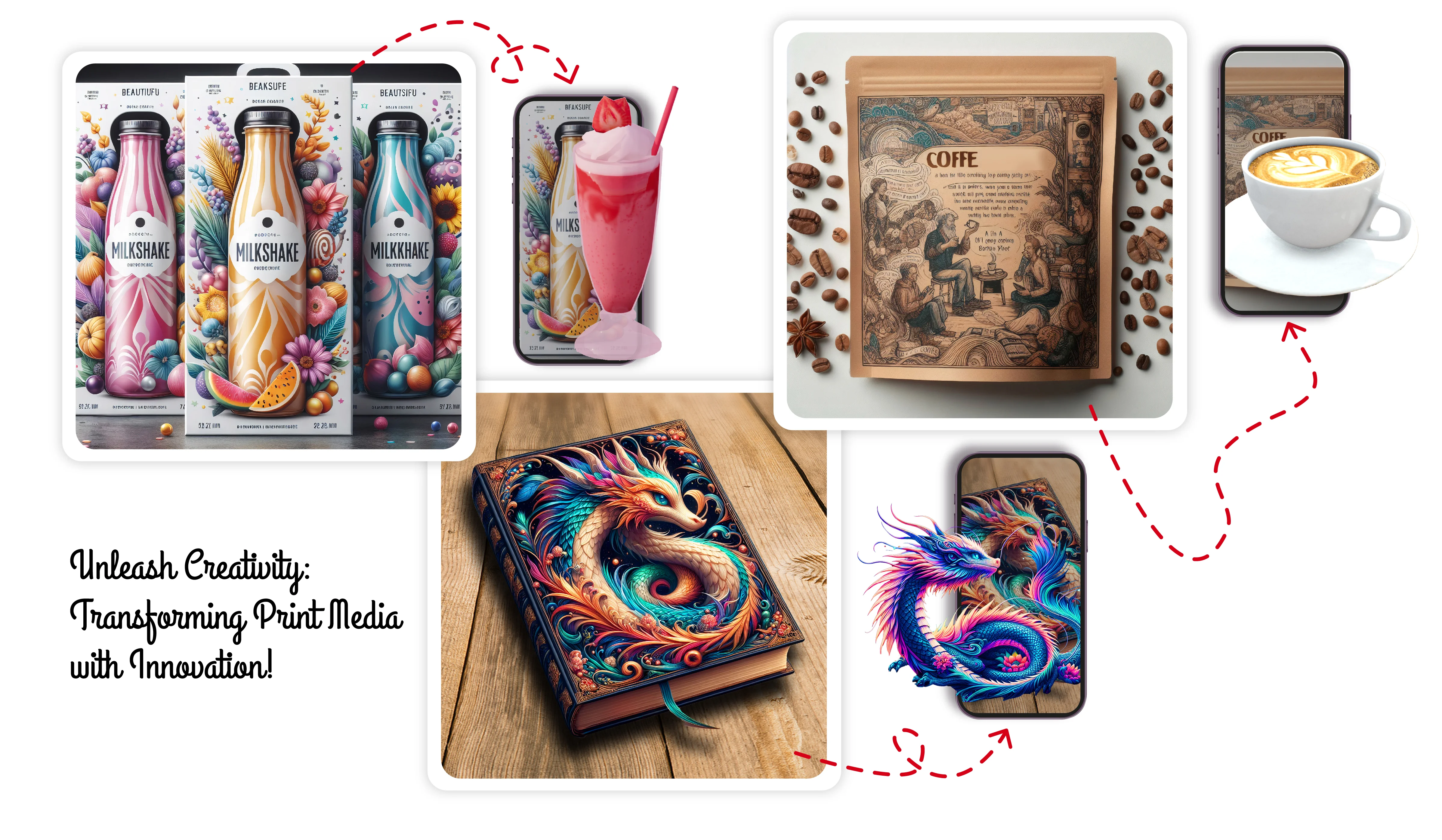
Printed image used for AI animation and AR

Best for

Portraits, package art, posters, postcards, book pages, museum labels, and classroom visuals that should reveal motion.

Watch out for

The source image must be strong. Low-quality or crowded images usually create weaker animations and weaker AR moments.

ARLOOPA fit

ARLOOPA Studio helps connect the animated result to a practical AR publishing path.

Tutorials

Video tutorial for this workflow

Watch the matching Studio walkthrough before you build so the setup, asset choices, and publishing steps are easier to follow.

How to Make Your Photo Come to Life with AI & AR | ARLOOPA Studio Tutorial

Watch the current Academy tutorial for making a photo come to life with AI and AR.

Video summary

This Academy walkthrough explains how to animate a still image with AI and connect the result to an AR experience in ARLOOPA Studio. The workflow is a practical fit for packaging, posters, postcards, books, museum labels, and classroom materials where a static image should trigger moving content.

Concept

What AI photo animation in AR is

AI photo animation takes a still image and turns it into short moving content. In AR, that animated result can appear from a printed image, a digital trigger, or another Studio workflow that connects the image to the viewer’s camera.

The goal is not motion for its own sake. The animation should help the visitor understand the image, remember it, or interact with it in a more meaningful way.

  • Use animation when movement adds context or emotion.
  • Keep the source image recognizable after the animation is created.
  • Design the AR moment around a short, clear reveal.

Steps

Step-by-step guide

Start with a source image that has one clear subject. Generate the animation, review the result, then add it to the AR workflow that best matches the physical or digital entry point.

After publishing, test the experience with the real image or printed material. A good desktop preview does not guarantee the final mobile journey is clear.

  1. 1Choose a clean source image with a clear subject.
  2. 2Generate the AI animation and review the movement.
  3. 3Save the animated result as the video content for AR.
  4. 4Choose the AR trigger or placement workflow in Studio.
  5. 5Attach the animated video and preview the result.
  6. 6Publish and test the full mobile path from image to animation.

Use cases

Best use cases for animated photo AR

Animated photo AR works well anywhere a static image already has an audience. Packaging can reveal product stories, posters can become event teasers, museum portraits can speak through motion, postcards can become greetings, and book illustrations can add a second explanatory layer.

The use case should decide the animation style. A museum portrait needs a different tone than a product package or classroom flashcard.

  • Packaging and labels that trigger product stories or instructions.
  • Posters, postcards, brochures, and cards that reveal short animated content.
  • Museums, galleries, and cultural spaces with portraits or archival images.
  • Books and classrooms where a static illustration can explain a concept.

Source images

Tips for choosing good source images

The source image determines how believable and useful the animation can be. Choose images with visible faces, objects, characters, or visual structure. Avoid images that are too small, too blurry, too dark, or visually crowded.

If the image will also be used as a marker or printed trigger, test it at the final size before public launch.

  • Prefer one main subject instead of a crowded scene.
  • Use good contrast and resolution.
  • Avoid heavy blur, glare, or compression artifacts.
  • Match the animation idea to the image’s original context.

FAQ

How to Animate a Photo with AI and View It in AR FAQ

Can I animate any photo for AR?

Many photos can be animated, but clear images with one main subject and enough resolution usually produce better results.

What can I use animated photo AR for?

It works well for packaging, posters, museum labels, postcards, books, classroom cards, and campaign images.

Does the animated photo need to be short?

Short animations are usually better because they load faster and keep the AR moment focused.

Can the source image be the marker?

Yes, if it has enough visual detail and contrast for reliable recognition in a marker-based workflow.

Do I need coding for this workflow?

No. The workflow is built around ARLOOPA Studio so creators can publish without custom code.

Next step

Animate a photo in ARLOOPA Studio

Use ARLOOPA Studio to turn a useful image into an animated AR moment for print, packaging, culture, or education.

Existing Studio pages

Related Solutions

Use these established Studio pages when you need deeper solution or industry detail beyond this guide.

Continue reading

Related Reading

These supporting guides answer the next practical questions readers usually have before launching an AR project.


ARLOOPA Inc. 2026