WebAR light estimation
What WebAR light estimation actually improves in a browser AR experience
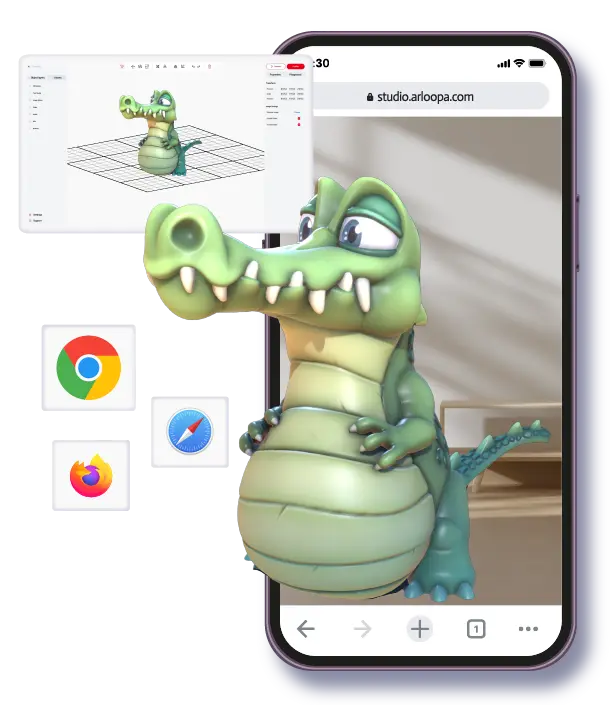
Light estimation helps a browser-based AR object feel less pasted onto the camera view. Instead of rendering a model with one flat lighting assumption, the experience can react more intelligently to the brightness and general light conditions around the user. That usually makes 3D content feel more believable on screen, especially when the object is meant to sit on a surface, appear in a room, or support a product demo. ARLOOPA Studio now supports light estimation in WebAR, which means teams can produce browser-based AR scenes that look more grounded without forcing users into an app first.
Best for
WebAR experiences where a 3D object should feel more natural in the real environment, especially in product, retail, event, and branded-demo use cases.
What it improves
It helps brightness and scene response feel closer to the user’s surroundings, which can make the object look more believable on mobile.
Watch out for
Light estimation improves presentation, but it does not fix weak 3D assets, poor scale, heavy scenes, or a confusing mobile entry flow.
Core idea
Light estimation makes WebAR scenes feel more grounded, not magically perfect
In practical terms, light estimation is about helping the rendered object respond better to the environment the phone camera sees. If the room is bright, dim, warm, or cooler, that information can influence how the 3D content appears. The result is not cinematic realism, but it is usually enough to make a browser-based object feel less detached from the scene.
That matters because browser AR often gets judged in the first few seconds. If the object looks too flat or too obviously disconnected from the environment, the whole experience feels less convincing. Light estimation improves that first impression and helps the scene feel more intentional.
- •It is mainly a realism and presentation improvement.
- •It matters most when the user expects a 3D object to sit naturally in the scene.
- •The value is strongest when the rest of the mobile experience is already well scoped.
Best-fit use cases
The biggest gains usually show up in product, event, and campaign experiences
WebAR light estimation is especially useful when the 3D object is the hero of the experience. Product visualization is the most obvious example. If a shopper opens a model in the browser, the object should feel like it belongs in the room rather than floating as a disconnected render. The same principle applies to event demos, branded activations, educational 3D explainers, and campaign moments where the object itself carries the message.
This is less important for very short scan interactions that are mostly about unlocking a video, opening an overlay, or triggering a lightweight action. In those cases, mobile load time and clarity of entry matter more than subtle lighting behavior. The strongest light-estimation use cases are the ones where visual credibility supports understanding or persuasion.
- •Product visualization where the object needs to feel more believable in the viewer’s space.
- •Event and campaign demos where a 3D hero object is the main interaction.
- •Educational or museum-style WebAR scenes where realism supports comprehension.
Limits
Light estimation improves realism, but it does not solve the rest of the AR brief
Teams should not treat light estimation as a replacement for good assets or good experience design. If the model is low quality, incorrectly scaled, badly optimized, or visually inconsistent, better lighting alone will not rescue it. The same goes for weak onboarding. A realistic object still underperforms if the user does not understand how to start, where to place it, or why it matters.
This is the right way to frame the feature: it is a quality multiplier for already solid WebAR work. When the brief is clear, the model is well prepared, and the phone journey is short and understandable, light estimation helps the whole result feel more mature.
- •It does not fix poor models, weak textures, or wrong scale.
- •It does not replace mobile optimization or a clear browser entry path.
- •It works best as part of a broader WebAR quality standard, not as a one-feature promise.
Why it matters now
ARLOOPA Studio can now use light estimation in WebAR without pushing the user into an app
That matters strategically because many teams want two things at the same time: low-friction browser entry and better visual credibility. Until recently, those goals often felt at odds. Browser delivery reduced install friction, but the result could look flatter than the team wanted. Light estimation narrows that gap and gives WebAR a stronger place in briefs that previously leaned toward app-based delivery only because realism mattered.
For ARLOOPA Studio users, the practical takeaway is simple. If the project should stay in the browser and the object itself needs to feel more natural in the real world, WebAR with light estimation deserves a real pilot. It is especially worth testing for retail, product storytelling, branded showcases, launch moments, and other scenes where realism affects the user’s confidence.
- •You can keep the no-app browser path and still improve visual grounding.
- •The feature is useful when the object is central to persuasion, not just decoration.
- •A realistic pilot is the fastest way to decide how much light estimation improves your actual use case.
FAQ
WebAR light estimation FAQ
What is light estimation in WebAR?
It is a way for the browser AR experience to respond more intelligently to the lighting conditions around the user so 3D content feels more believable on screen.
When does light estimation matter most?
It matters most when the 3D object is central to the experience, especially in product visualization, branded demos, event moments, and educational 3D scenes.
Does light estimation fix a weak WebAR experience?
No. It improves visual realism, but it does not fix poor assets, unclear onboarding, bad scale, or heavy mobile scenes.
Why is this important for ARLOOPA Studio?
Because ARLOOPA Studio can now support light estimation in WebAR, which gives teams a better way to combine browser-based access with more convincing visual presentation.
Existing Studio pages
Related Solutions
Use these established Studio pages when you need deeper solution or industry detail beyond this guide.
ARLOOPA Studio
Create WebAR, image-tracked, markerless, face-tracked, and geospatial AR experiences without code. Build, publish, and manage AR campaigns faster with ARLOOPA Studio.
Open pageProduct Visualization
Help buyers understand products in 3D and AR before purchase. Build product demos, placement previews, and interactive product stories without coding.
Open pageEvent Experiences
Create AR booth experiences, trade show activations, sponsorship layers, scavenger hunts, and product reveals with WebAR and no-code AR tools that increase attendee engagement.
Open pagePricing
Compare ARLOOPA Studio pricing plans for WebAR, geospatial AR, image tracking, and no-code AR creation, and choose the right option for your team or business.
Open pageSchedule a demo
Book a demo with ARLOOPA Studio to see how your team can create no-code augmented reality experiences for marketing, education, events, packaging, and product storytelling.
Open pageContinue reading
Related Reading
These supporting guides answer the next practical questions readers usually have before launching an AR project.
WebAR Platform Guide
Compare WebAR platforms by mobile access, publishing control, supported formats, and whether a non-technical team can actually run them after launch.
Read guideBest WebAR Platforms
Use this 2026 shortlist guide to compare WebAR platforms by team fit, delivery model, continuity, and whether the workflow can survive after the first pilot.
Read guideWebAR vs App-Based AR
Use this comparison to decide whether browser delivery or native app delivery is the more honest fit for your AR project.
Read guide


