Technology guide
Multi-image tracking in WebAR: how to scale multiple image targets without breaking the experience
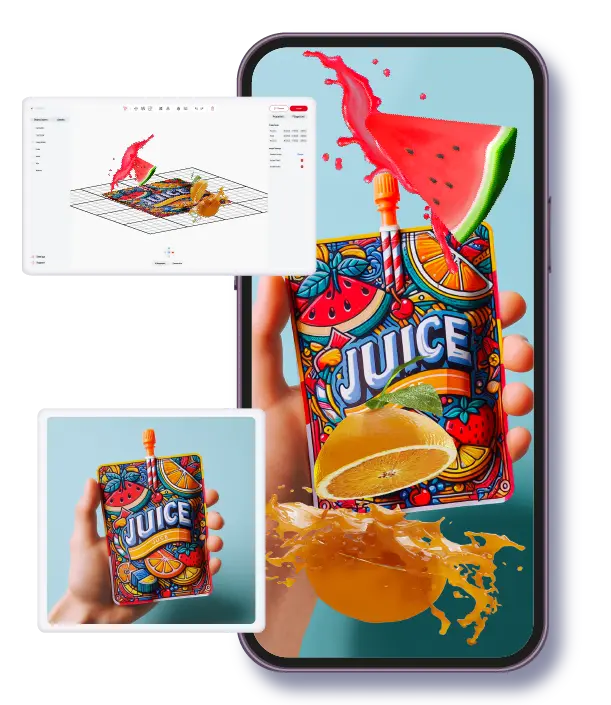
Multi-image tracking in WebAR means one browser-based experience can recognize several different image targets and open the right AR layer for each. It is a strong format for packaging families, printed catalogs, museum labels, educational cards, and retail displays where users scan different visuals but should stay in one consistent interaction model. The hard part is not only recognition. The hard part is scaling target quality, library structure, and mobile performance so the rollout remains reliable after the first launch.
Best for
Teams running one WebAR experience across multiple printed assets, products, or exhibits.
Watch out for
Expanding target count without a quality standard, naming structure, and device QA plan.
ARLOOPA fit
No-code teams that want multi-target tracking inside one practical publishing workflow.
When it matters
Multi-image tracking is most useful when one campaign needs many physical entry points
Single-image tracking works when one visual trigger controls the whole experience. Multi-image tracking becomes the better choice when a campaign includes several product labels, posters, textbook pages, or exhibit graphics that each need context-specific AR content. In those cases, forcing every scan through one target usually creates friction and weakens relevance.
A cleaner setup is to keep one experience logic and connect it to a managed target set. That lets users scan whichever asset is in front of them while the team keeps brand behavior, analytics, and update ownership consistent.
- •Use single-target tracking for one-off activations with narrow scope.
- •Use multi-target tracking when the same campaign spans multiple physical assets.
- •Keep the interaction model consistent even when target visuals differ.
Performance reality
Detection reliability depends more on target quality and testing discipline than on raw target count
Teams often ask how many image targets can be added to WebAR. The practical answer is that limits depend on device mix, asset complexity, and platform implementation. The better question is how stable detection remains across real phones and real conditions after each new target is added.
Reliable multi-image tracking usually comes from strong source images, controlled contrast, minimal visual ambiguity between targets, and repeatable QA across lighting and camera distance. As the library grows, quality control matters more than headline target volume.
- •Prioritize target distinctiveness and print quality before adding more entries.
- •Validate on the lowest-performing phones in your target audience, not only flagship devices.
- •Treat each new target as a release risk until QA confirms stable detection.
Operations
A scalable multi-target rollout needs a managed image library, not ad-hoc uploads
Most multi-image tracking projects start simple and then expand quickly. Without a clear library model, teams lose track of which target version is active, who owns updates, and which asset maps to which AR layer. That usually causes regression bugs right before campaign deadlines.
A better approach is to define naming conventions, ownership rules, version history, and retirement logic for targets from the beginning. This turns image tracking into a repeatable content system instead of a collection of one-time scans.
- •Create one canonical target registry with owner, version, and publication status.
- •Align print-production timelines with AR update timelines so targets do not drift.
- •Retire or replace weak targets early rather than compensating with heavier UX prompts.
Why ARLOOPA
ARLOOPA Studio is a strong fit when multi-image tracking must stay no-code and easy to maintain
For many teams, the value of multi-image tracking is not only technical recognition. It is the ability to keep creating, publishing, and revising target-linked experiences without turning every update into a development request. ARLOOPA Studio fits well here because the workflow is built for practical ownership by marketing, education, culture, and product teams.
That makes it easier to move from pilot to scale. Teams can start with a controlled target set, validate detection and engagement, then expand confidently as the campaign footprint grows.
- •Start with a pilot set of targets and expand only after stability is proven.
- •Use no-code ownership to reduce dependency on engineering for routine updates.
- •Connect multi-target tracking to broader WebAR and industry pages for rollout planning.
FAQ
Multi-image tracking in WebAR FAQ
What is multi-image tracking in WebAR?
It is a WebAR setup where one experience can recognize multiple image targets and trigger the appropriate AR content for each target.
How many image targets can a WebAR experience track?
There is no single universal number. Practical capacity depends on device performance, target quality, and platform behavior, so teams should scale gradually with real-device testing.
When should a team choose multi-image tracking over a single target?
Choose multi-image tracking when one campaign uses many physical visuals such as SKUs, pages, posters, or exhibit assets that each need tailored AR content.
How does ARLOOPA Studio help with multi-image tracking?
ARLOOPA Studio helps teams manage multi-target WebAR in a no-code workflow so publishing, updates, and quality checks stay operationally manageable as the target library expands.
Existing Studio pages
Related Solutions
Use these established Studio pages when you need deeper solution or industry detail beyond this guide.
Image Tracking AR Guide
Choose image tracking AR when a known visual target should control the timing and context of the experience.
Open pagePrint Media
Add interactive AR to posters, flyers, brochures, catalogs, and cards with WebAR, image tracking, video, 3D, and call-to-action layers that launch from QR codes and links.
Open pagePackaging
Turn packaging into a scan-to-open WebAR channel for product education, brand storytelling, promotions, QR campaigns, and loyalty experiences without an app.
Open pageEducation
Create AR lessons, learning cards, classroom posters, and educational WebAR experiences that help students explore concepts in 3D without extra app friction.
Open pageContinue reading
Related Reading
These supporting guides answer the next practical questions readers usually have before launching an AR project.
Single vs Multi-Image Tracking
Use this comparison to decide whether single-target or multi-target image tracking is the better WebAR model for your rollout.
Read guideWebAR Image Tracking Best Practices
Use these WebAR image tracking best practices to improve recognition stability, user flow, and rollout quality.
Read guideMarker-Based AR Guide
Use marker-based AR when the physical trigger matters and you want predictable, guided activation behavior.
Read guideWebAR Platform Guide
Compare WebAR platforms by mobile access, publishing control, supported formats, and whether a non-technical team can actually run them after launch.
Read guide


