1
Upload the Thanksgiving image
Last year's dinner photo, a family picture among fall leaves or a designed autumn card all work. Upload the file you are going to print.
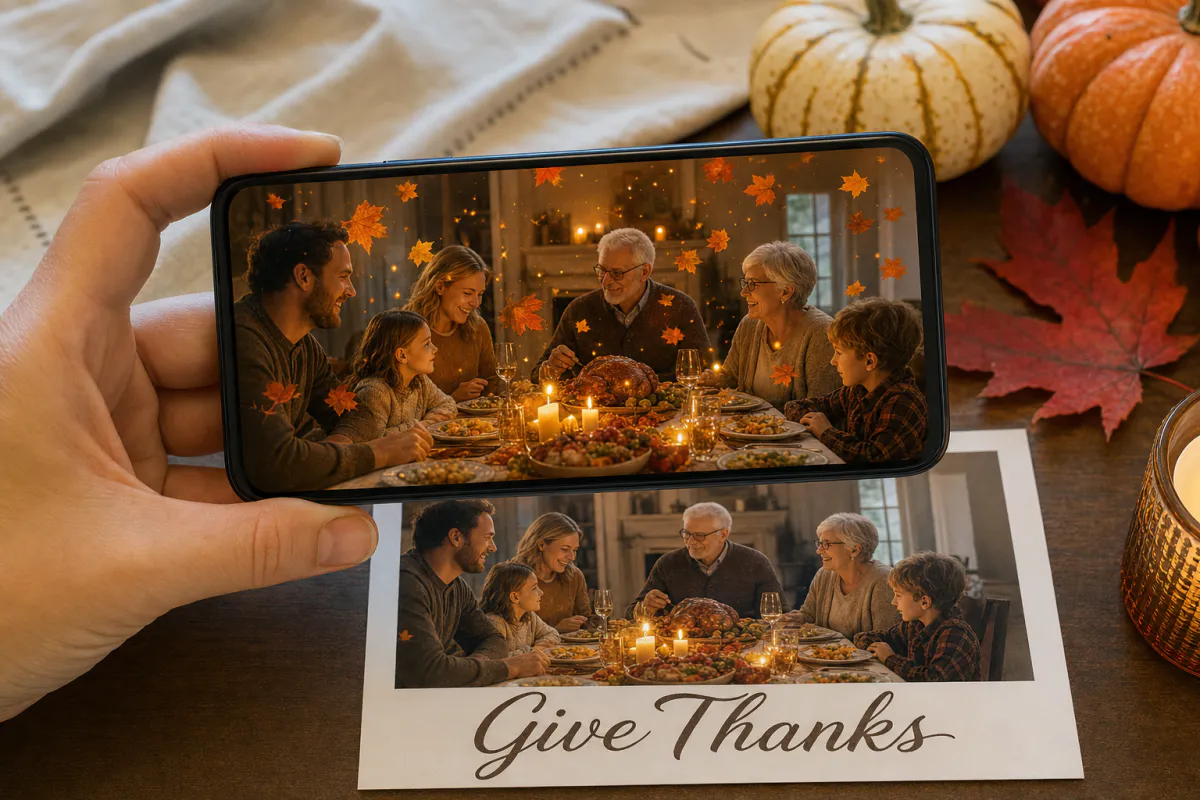
Say thank you with a card that glows like a candlelit table. Upload a family photo or an autumn design, and Studio animates it with drifting leaves and flickering candlelight in a warm, cozy glow. When someone scans the printed card, the scene gently comes alive.
Perfect for
Family Thanksgiving cards, dinner place cards, notes for hosts, gratitude cards for teachers and volunteers, and client thank-yous from small businesses.
Under the hood
Marker-based AR in which the printed image is the target and a short AI video of that image plays over it.
Access
Guests scan a QR code and watch in their phone browser through WebAR. Publishing to the ARLOOPA app is an option too.
Step by step
The builder opens with a Thanksgiving preset named "Happy Thanksgiving AR card" and a prompt for drifting autumn leaves and flickering candlelight that keeps people and the composition natural.
Last year's dinner photo, a family picture among fall leaves or a designed autumn card all work. Upload the file you are going to print.
Keep the leaves and candlelight, or add "steam rises from the pie" or "the fireplace crackles", staying within the 300-character limit.
Use a clear name such as "Thanksgiving place cards", then keep Web AR on so relatives of every age can open it from a QR code.
The coin estimate appears first. Studio then turns your image into a roughly five-second AI video and sets it up as an image-tracking experience.
Publish, print with the QR code on the back, and scan one card under your dining room lights before dinner day.
Ideas
Thanksgiving is about gathering, so the card can do more than arrive in the mail. Put an animated photo card at each seat, and the moment guests scan theirs becomes a shared conversation starter before the meal.
A card for a teacher, coach or volunteer, made from a photo of the group they help, shows thanks they can replay.
Printing
Warm oranges, browns and golds can blur together on camera, especially under dim dining room lighting. A photo with sharp faces, a busy table or a pile of textured leaves gives the phone far more to recognize than a soft sunset or a plain wood background.
Use the exact image you uploaded for the print, and choose matte card stock rather than glossy. Kraft paper shifts print colors, so test-scan it before ordering.
Timing and business
Thanksgiving falls on the fourth Thursday of November in the United States and on the second Monday of October in Canada. Mail cards a week or more ahead.
For businesses, Thanksgiving is a natural moment for a thank-you that is not a sales pitch. A team-photo postcard with falling leaves can reach clients before the end-of-year rush, and the analytics page shows scans.
FAQ
Yes. Create one experience per photo, since each printed image is its own scan target. Name each experience after the guest so they stay organized in Studio.
Not with WebAR: a QR code opens it in the phone browser, then they aim the camera at the card.
It asks for autumn leaves drifting down and candlelight flickering with a warm, cozy glow, while keeping people and the composition natural. You can edit the prompt before generating.
Yes. The template works with any image and any date. Just generate and test the card a few weeks before the October holiday.
Yes. Generation is paid in Studio coins, with the estimate shown before you start. See the pricing page for plans that include coins.
More templates
Every occasion uses the same quick workflow: upload a photo, add AI motion, share as WebAR.
Christmas AR card template
Family photo cards, cards for friends abroad, teacher and classroom cards, and small businesses sending seasonal thank-yous.
See the guideHoliday AR postcard template for businesses
Corporate Christmas and New Year cards, client thank-you mailers, holiday packaging inserts and in-store seasonal posters.
See the guideNew Year AR greeting card template
Personal New Year cards, year-in-review photo greetings, team cards and client wishes from agencies or small businesses.
See the guide


Solutions
ARLOOPA Inc. 2026