1
Upload the print-ready artwork
Use the same high-resolution file that goes to the printer, without the frame or mat. Only upload work you created or have the rights to animate.
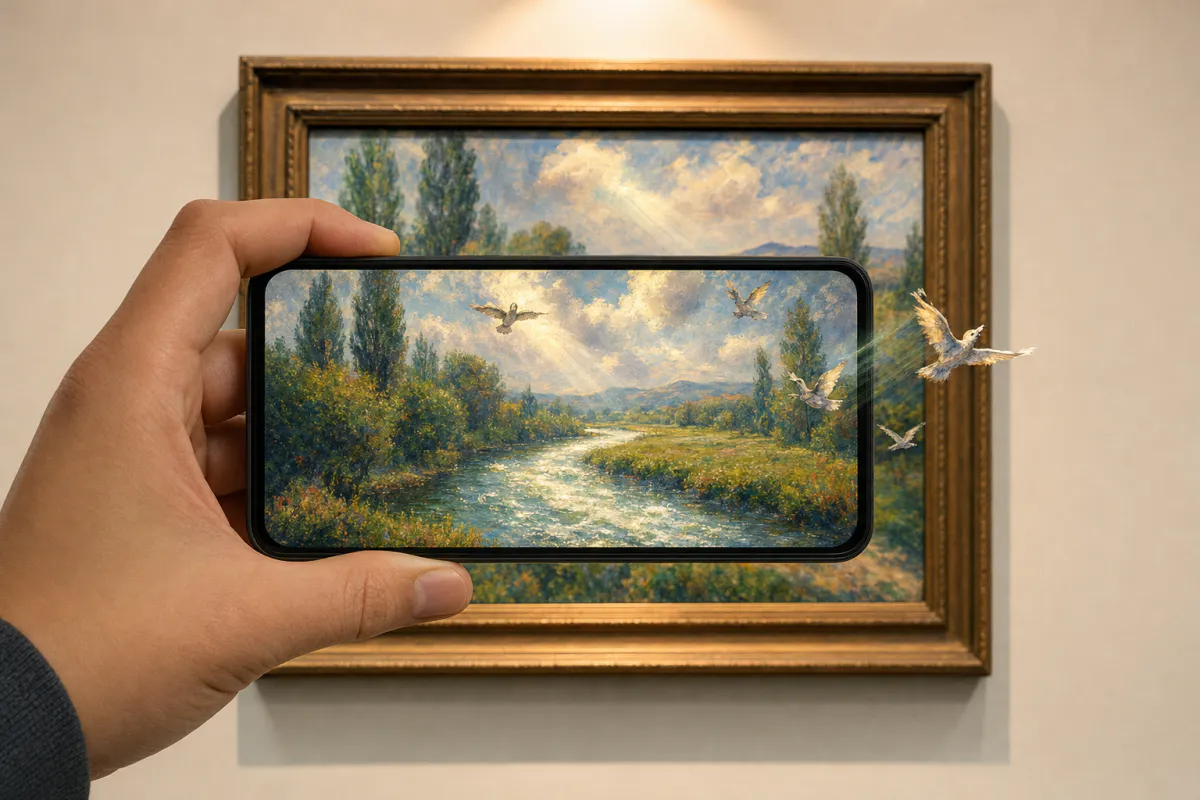
Give a print a second life on the wall. Upload your artwork, and Studio generates subtle motion that respects the artist’s style, brushwork and palette, while the composition and signature stay put. When someone points a phone at the printed piece, the animation plays right on top of it.
Best for
Limited edition prints, gallery and exhibition pieces, art fair stock, posters, postcards and print-on-demand products.
What it creates
An image-tracking AR experience on the artwork, opened from a QR code as WebAR or in the ARLOOPA app.
What stays sharp
The preset keeps the composition and signature unchanged, so the motion adds to the piece without rewriting it.
Step by step
The builder opens with the art print preset: restrained motion that follows the artwork’s own style rather than adding generic effects.
Use the same high-resolution file that goes to the printer, without the frame or mat. Only upload work you created or have the rights to animate.
Keep the subtle default, or describe what should move: clouds drifting across a landscape, brushstrokes rippling like water, a figure turning their head.
Use the artwork title and edition in the name, and choose Web AR for any visitor, the ARLOOPA app, or both.
After the coin estimate, Studio creates a clip of about five seconds. Watch it critically and regenerate until the motion feels true to the work.
Place a small QR code on the label, back or certificate, print a proof on the final paper and scan it in the frame where it will hang.
Who it is for
Artists can offer a living edition alongside a standard print, or use the motion to show process and intent. Galleries can add a quiet layer to an exhibition, where visitors scan a label and watch a work move without screens on the walls.
Print shops can offer AR as an add-on for customers who bring their own artwork. Rights come first in every case: animating a piece creates a derivative of it, so artists should keep control of their work, galleries need the artist’s consent, and print shops should confirm customers own or license what they upload.
Print and tracking
Fine art papers with a matte surface are ideal for tracking, while glossy and metallic finishes throw highlights that change as the viewer moves. Print the artwork exactly as uploaded, since a different crop, border or color profile can make the print harder to recognize.
Framing glass is the biggest obstacle. Standard glass reflects windows and gallery spotlights across the image, so use anti-reflective glass or acrylic where possible, angle the lighting to avoid a glare spot at viewing height, and remember that a wide mat does not affect tracking as long as the whole artwork is visible.
Go further
Open the experience in the Studio editor to add context. A recorded artist statement, a button that links to the online shop or edition details, or a 3D element placed beside the frame can all sit alongside the animation.
For exhibitions and shops, the analytics page shows how often each piece is viewed in AR. On eligible plans, galleries and print shops can present WebAR under their own branding and a custom hostname.
FAQ
No. Published as WebAR, it opens from a QR code in the phone browser, and the viewer points the camera at the print.
Only if you have the rights. Animating a work creates a new version of it, so get permission from the artist or rights holder before uploading.
The preset asks the AI to keep the composition and signature unchanged and to respect your style and palette. Review the result and regenerate if anything is off.
It can, but reflections make scanning harder. Anti-reflective glass or acrylic and careful lighting give the most reliable results.
Yes. Create one experience per artwork, and confirm the customer owns or licenses the image before animating it.
More templates
Every occasion uses the same quick workflow: upload a photo, add AI motion, share as WebAR.
AR restaurant menu template
Signature dish pages, table tents, specials boards, dessert cards and window menus for restaurants, cafés, bars and food trucks.
See the guideAR event poster template
Concerts, club nights, festivals, theater runs, conferences, exhibitions, sports fixtures and product launches.
See the guideReal estate AR flyer template
Listing flyers, open house handouts, just-listed postcards, window cards at the agency and new development brochures.
See the guide


Solutions
ARLOOPA Inc. 2026