1
Upload the illustrated page
Use the final page art or spread half that will be printed. Busy, colorful illustrations give the camera plenty to recognize.
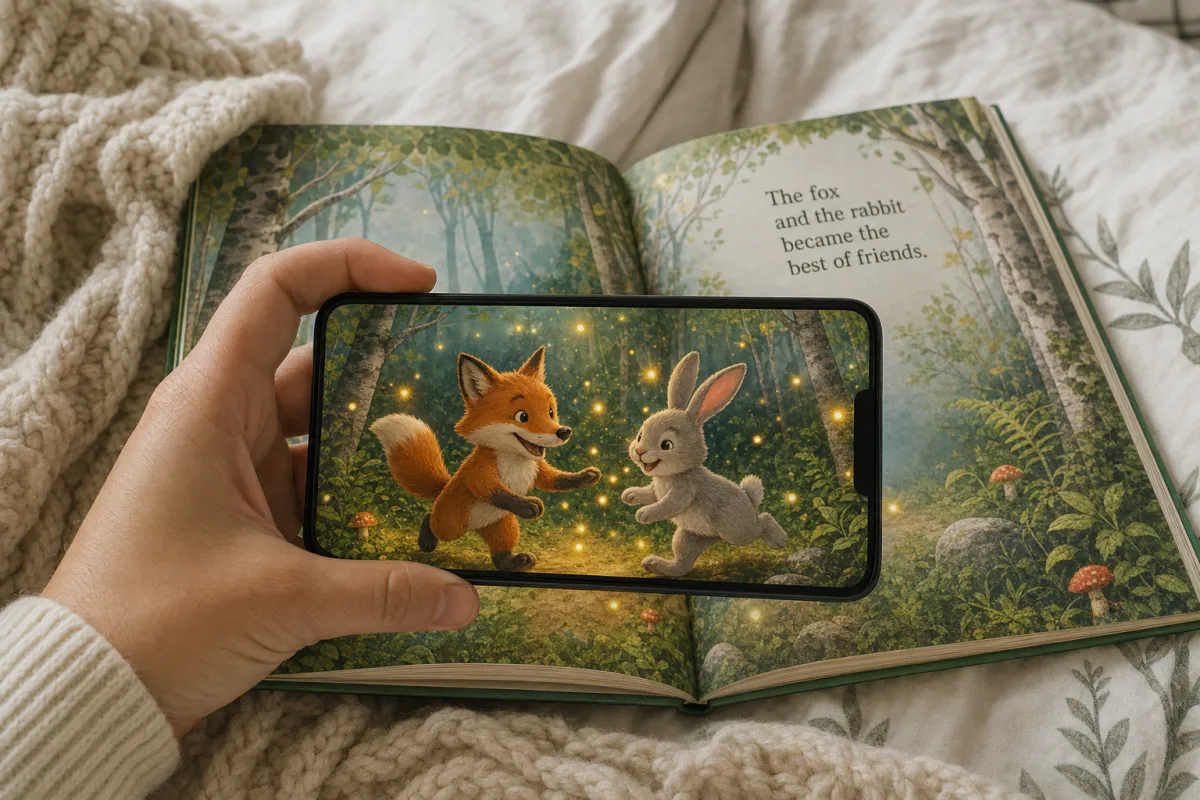
Let a reader watch the story step off the page. Upload an illustration, and Studio generates a gentle AI animation in a friendly storybook style, with characters that move and scenes that come alive, while the illustration style, characters and text stay as drawn. It plays right on the printed page when a phone or tablet points at it.
Best for
Picture books, early readers, activity books, classroom worksheets, book covers and promotional bookmarks.
What it creates
A marker-based AR experience on one illustrated page, opened as WebAR from a QR code or in the ARLOOPA app.
What stays sharp
The preset keeps the artist’s style, the characters and every word of text unchanged, so the book still reads as designed.
Step by step
The builder opens with the children’s book preset: soft, friendly character motion that respects the illustration.
Use the final page art or spread half that will be printed. Busy, colorful illustrations give the camera plenty to recognize.
Keep the gentle character motion, or tell the story in under 300 characters, such as the fox waving or rain starting to fall over the village.
Name it by title and page number and choose Web AR, the ARLOOPA app, or both. Web AR opens without installing anything.
Check the coin estimate and generate. Studio creates a short AI clip of around five seconds that plays over the illustration.
Print the page in the real format, open the book naturally and scan it the way a child or parent would hold the device.
Who it is for
Publishers can add an AR page to a new title or a reprint without changing the book’s design, and use the same moment in launch posters and shop displays. Independent authors can give school visits and book fairs a small surprise that makes their book stand out on the table.
Teachers can bring a class story or a student-drawn illustration to life, then use it as a starting point for writing and discussion. If you animate someone else’s book or artwork, ask the publisher or illustrator first, since the AI video is a new version of their work.
Print and tracking
Books do not lie flat the way a poster does. Pages bend toward the spine, and in a tightly bound book the inner part of an illustration curves away from the camera, so choose an image that sits mostly on one page and keep its important details away from the gutter.
Binding style makes a difference. Board books, spiral binding and lay-flat bindings hold a page flatter than perfect binding, and uncoated or matte paper avoids the glare that glossy pages pick up under classroom lights.
Go further
Open the experience in the Studio editor to go beyond the animation. Add audio narration of the page, a 3D model of a character beside the book, or a button that links to an activity sheet or the author’s website.
Scene Logic lets a child tap to trigger the next moment, such as a sound or a hidden object appearing. The analytics page shows views, so publishers and authors can see which titles and pages readers actually scan.
FAQ
No, if you publish as WebAR. They scan the QR code in the book with a phone or tablet camera, and the experience opens in the browser.
The preset asks the AI to keep the illustration style, characters and text unchanged. Review every clip and refine the prompt if anything drifts from the original art.
Only with permission. Ask the publisher or illustrator before animating published artwork, especially if you plan to share or sell the result.
Yes. Each illustration is its own experience with its own scan target, so you can create as many AR pages as the book needs.
It works best on pages that lie fairly flat. Lay-flat or board bindings and illustrations kept away from the spine give the most reliable scans.
More templates
Every occasion uses the same quick workflow: upload a photo, add AI motion, share as WebAR.
AR restaurant menu template
Signature dish pages, table tents, specials boards, dessert cards and window menus for restaurants, cafés, bars and food trucks.
See the guideAR event poster template
Concerts, club nights, festivals, theater runs, conferences, exhibitions, sports fixtures and product launches.
See the guideReal estate AR flyer template
Listing flyers, open house handouts, just-listed postcards, window cards at the agency and new development brochures.
See the guide


Solutions
ARLOOPA Inc. 2026