1
Upload the announcement image
Use the final card layout with the photo, name and birth details, or the photo alone if that is what you will print. The phone recognizes exactly what you upload.
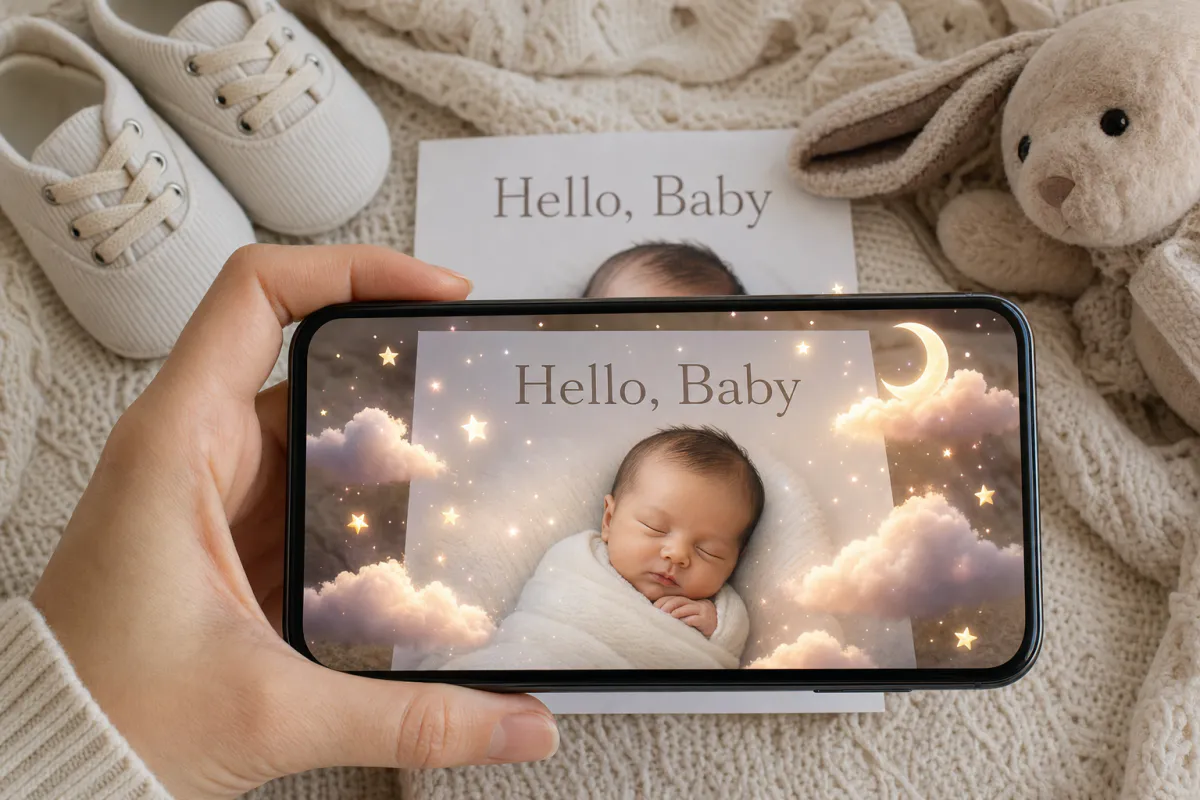
Announce your baby with a card that holds a small, quiet surprise. Upload a newborn portrait, a bump photo or a nursery picture, and Studio adds soft drifting clouds, tiny twinkling stars and a gentle pastel glow. When family scan the printed card, the photo comes softly to life.
Best for
Birth announcements, pregnancy announcements for grandparents, adoption announcements and newborn photographers looking for a keepsake add-on.
What it creates
A marker-based AR card in which your photo is the scan target and a calm, AI-animated version of it appears on top.
Easy for family
Published as WebAR, it opens from a QR code in the phone browser, so great-grandparents can watch without installing anything.
Step by step
The builder opens with a baby announcement preset: the experience is named “Baby announcement AR card” and the prompt asks for drifting clouds, twinkling stars and a pastel glow, while keeping the baby and everyone else in the photo natural.
Use the final card layout with the photo, name and birth details, or the photo alone if that is what you will print. The phone recognizes exactly what you upload.
The preset is deliberately calm. You can add “the mobile above the crib turns slowly” or “sunlight moves across the blanket,” but avoid fast motion around a newborn’s face.
Most relatives will open it from the QR code in a browser. Add the ARLOOPA app if your family already has it.
Studio creates a short AI video, around five seconds, and attaches it to your image. You will see the coin estimate first.
Publish, print one copy with the QR code, scan it, and order the rest once it works.
Ideas
Baby news travels in stages: first to close family, then to everyone else. An AR card fits both. A pregnancy announcement can hide in a gift for future grandparents, and the birth announcement can go to the wider list a few weeks after the baby arrives.
Pick the moment that tells your story best. Big siblings holding a sign, tiny feet on a parent’s hand, or the empty nursery waiting for its occupant all become more tender with a little drifting light.
Print tips
Newborn portraits are often shot on plain white wraps or soft blankets with very little texture, which looks lovely but gives a phone camera few features to recognize. If your favorite shot is minimal, place it on a card layout with the baby’s name, birth stats and a patterned border, and upload that full layout.
Birth announcement cards tend to be small and handled often. A thick matte cardstock stays flat and avoids glare, while a thin glossy print can curl on a shelf and reflect nursery lamps.
For photographers
Photographers already deliver the images families use on announcements. Offering an AR version of the chosen shot is a natural extra that takes a few minutes in Studio and needs no new equipment.
Deliver it with the print order: the family gets the printed announcements with a QR code, and the moving version lives in the experience you created. Stationers who design announcement cards can offer the same option at checkout.
FAQ
Not with WebAR. Relatives open the QR code with the phone camera, and the announcement plays in the browser once the phone is aimed at the card.
The preset prompt asks Studio to keep people, faces and the original composition natural and unchanged, and to add only soft clouds, stars and glow around them. Watch the result before you share it.
Plain backgrounds are harder to track. Upload the full card design with the name, details and a patterned border, and print exactly that design.
Yes. Any image works, from an ultrasound photo on a patterned card to a bump photo. Adjust the prompt to describe the motion you want.
More templates
Every occasion uses the same quick workflow: upload a photo, add AI motion, share as WebAR.
Birthday AR card template
Milestone birthdays, cards for grandparents and friends far away, kids’ party invitations and birthday greetings from small businesses to regular customers.
See the guideWedding AR invitation template
Couples planning printed invitations, stationers adding a premium option to a suite, and planners matching invitations to day-of signage.
See the guideSave the date AR card template
Engagement photo save the dates, destination weddings with guests abroad, and photographers who want to deliver more than a gallery after an engagement session.
See the guide


Solutions
ARLOOPA Inc. 2026