1
Upload the announcement design
Use the final announcement or invitation layout, or the senior photo alone if that is what you will print. The phone looks for this exact image.
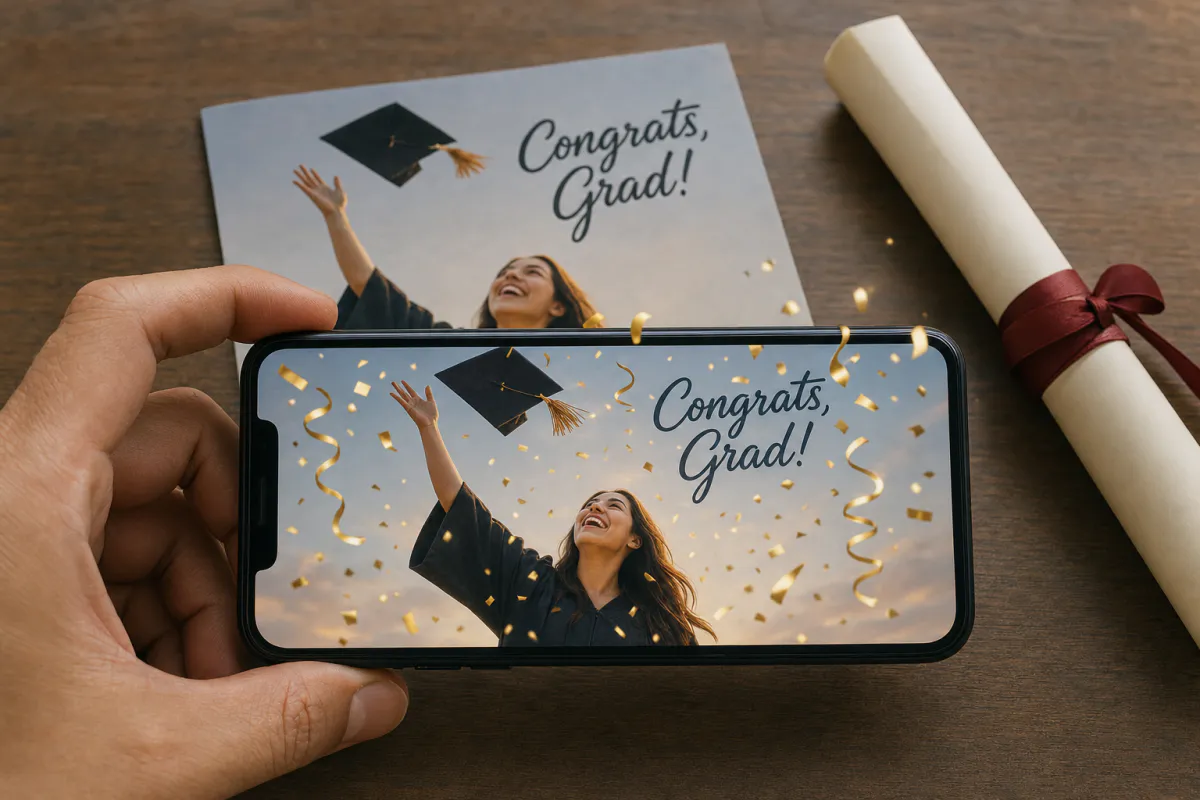
Celebrate the diploma with a card that cheers when scanned. Upload a cap-and-gown portrait, a senior photo or a campus snapshot, and Studio adds bursting confetti and falling golden streamers. Family point a phone at the printed announcement and watch the big moment play out on top of it.
Best for
High school and college graduation announcements, grad party invitations, senior portrait photographers and schools celebrating a graduating class.
What it creates
A marker-based AR card: the printed announcement is the scan target, and a short AI-animated celebration plays on top.
Works on any phone
Publish as WebAR so relatives open it from a QR code in the browser, or publish to the ARLOOPA app as well.
Step by step
The builder opens with a graduation preset: the experience is named “Graduation AR card” and the prompt asks for bursting confetti and golden streamers while leaving the graduate and the scene as photographed.
Use the final announcement or invitation layout, or the senior photo alone if that is what you will print. The phone looks for this exact image.
Mention school colors or a setting, like “confetti in navy and gold” or “the clock tower glows behind them.” The prompt allows up to 300 characters.
Web AR suits announcements going to grandparents, neighbors and family friends who are unlikely to have the app.
Studio makes a roughly five-second AI video from your image and ties it to the printed card. The builder shows the coin estimate before you generate.
Publish, add the QR code beside the party details, test one printed card and then mail the stack.
Ideas
Graduation season produces a lot of paper: announcements, party invitations, thank-you notes and photo prints for relatives. Any of them can carry the AR, but the announcement is the one people keep, so that is usually the best place to start.
Think about the story, not just the cap. A first-day-of-kindergarten photo that bursts into confetti on the graduation card, or a lab, stage or field where the graduate spent four years, makes the moment feel earned.
Print tips
Caps and gowns are usually large areas of one dark, flat fabric, which gives the phone little to recognize. Portraits with a campus building, trees, a banner or a busy background track far better than a studio shot on a seamless backdrop.
Announcements are often printed by the hundred, so the test scan matters. Party invitations also tend to carry lots of text; keep the event details next to the photo instead of printed across it.
Schools and photographers
Senior portrait photographers can add an AR announcement to their packages: the family chooses a favorite shot, the photographer generates the experience and delivers the print files with the QR code included.
Schools and parent groups can use the same template for class composites, yearbook covers or a celebration poster at the ceremony. Event planners running grad parties can match the invitations to a scannable welcome sign.
FAQ
Not for WebAR experiences. Relatives open the QR code in the phone browser, then hold the phone over the announcement to watch the confetti.
Large areas of plain dark fabric and seamless backdrops give the camera few features to track. Use a photo with more background detail or place it in a busier card layout.
Yes. Upload the invitation artwork as the scan target and keep the party details printed clearly so guests can read them without scanning.
Yes. A class photo, composite or yearbook cover can be the scan target. Every printed copy of that image triggers the same experience.
Yes. Open it in the Studio editor later to adjust the content. The printed image stays the same scan target.
More templates
Every occasion uses the same quick workflow: upload a photo, add AI motion, share as WebAR.
Birthday AR card template
Milestone birthdays, cards for grandparents and friends far away, kids’ party invitations and birthday greetings from small businesses to regular customers.
See the guideWedding AR invitation template
Couples planning printed invitations, stationers adding a premium option to a suite, and planners matching invitations to day-of signage.
See the guideSave the date AR card template
Engagement photo save the dates, destination weddings with guests abroad, and photographers who want to deliver more than a gallery after an engagement session.
See the guide


Solutions
ARLOOPA Inc. 2026