1
Choose a photo she loves
An old family snapshot, a picture with the grandkids or her in her garden all work. Upload the exact version you plan to print.
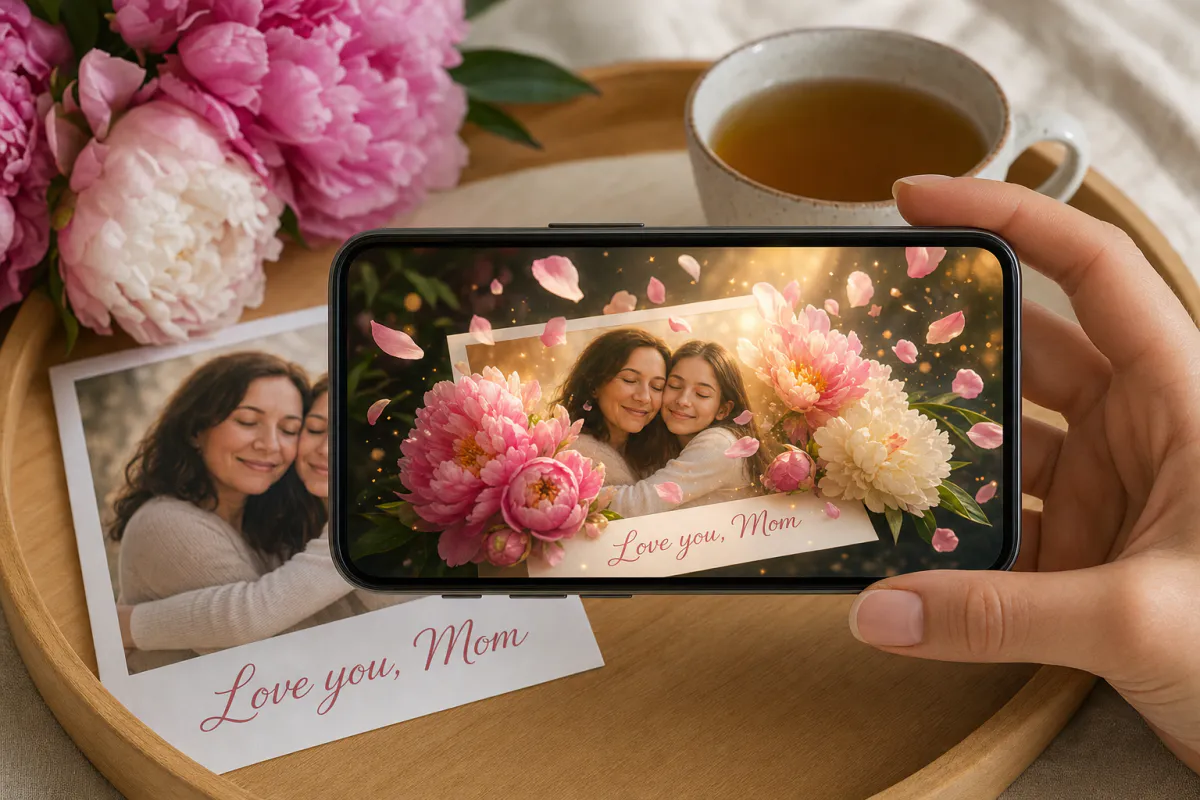
Turn a favorite photo of Mom into a card she will keep scanning. Upload the picture, and Studio animates it with flowers gently opening and petals floating in warm golden light. When she points her phone at the printed card, the memory comes alive in her hands.
Ideal for
Cards from kids and grown children, gifts for grandmothers, long-distance greetings, and florists or cafés adding something personal to orders.
How it works
Your photo becomes an image-tracking target, and a short AI video of that same photo plays over the print when it is scanned.
Viewing options
Mom can scan a QR code and watch in her phone browser via WebAR, or open the card in the ARLOOPA app if you publish it there.
Step by step
The builder opens with a Mother's Day preset: the name "Mother's Day AR card" and a prompt for flowers opening and petals floating in golden light, with faces left natural.
An old family snapshot, a picture with the grandkids or her in her garden all work. Upload the exact version you plan to print.
Keep the opening flowers, or mention something that is hers, such as "her favorite roses sway" or "the kitchen window glows". The prompt allows up to 300 characters.
Add a name, then leave Web AR on. The browser route only needs the phone camera.
See the coin estimate, then generate. Studio turns your photo into a roughly five-second AI clip and builds the marker-based card around it.
Publish, print the card with a QR code and a short "Scan me" note on the back, and try it once before you hand it over.
Ideas
The strongest cards start with a photo that already matters to her. A faded picture of her holding you as a baby, animated with petals and light, says more than a stock flower design.
Siblings can each sign the back of one card, and grandchildren can draw Grandma and make the drawing the scan target.
Photo tips
Old prints are perfect for this card, but scan them properly first. Lay it flat in good light and capture it straight on; a tilted snapshot adds blur and glare.
Portraits with a plain studio backdrop give the camera less to work with than a photo full of furniture, plants or patterned clothes. If your favorite has a big empty background, try a wider crop.
Timing and shops
Mother's Day is not on the same date everywhere. In the United States it falls on the second Sunday in May, while many other countries celebrate on a different day, some as early as March. Check her local date before printing.
Florists and bakeries can offer the card as an add-on: the customer shares a photo when ordering, and the printed AR card goes out with the flowers or cake.
FAQ
Not with WebAR. She scans the QR code with her phone camera, the card opens in the browser, and she points the phone at the printed photo.
Yes. Scan or photograph it flat and in even light, upload that file, and print it again as the card. The new print must match the uploaded image so the phone can recognize it.
The preset prompt asks the AI to keep people, faces and the composition natural and unchanged while flowers and light move around them. Preview it before printing.
Yes. The printed photo stays the scan target, but you can open the experience in the Studio editor later and change or add content without reprinting.
More templates
Every occasion uses the same quick workflow: upload a photo, add AI motion, share as WebAR.
Christmas AR card template
Family photo cards, cards for friends abroad, teacher and classroom cards, and small businesses sending seasonal thank-yous.
See the guideHoliday AR postcard template for businesses
Corporate Christmas and New Year cards, client thank-you mailers, holiday packaging inserts and in-store seasonal posters.
See the guideThanksgiving AR card template
Family Thanksgiving cards, dinner place cards, notes for hosts, gratitude cards for teachers and volunteers, and client thank-yous from small businesses.
See the guide


Solutions
ARLOOPA Inc. 2026